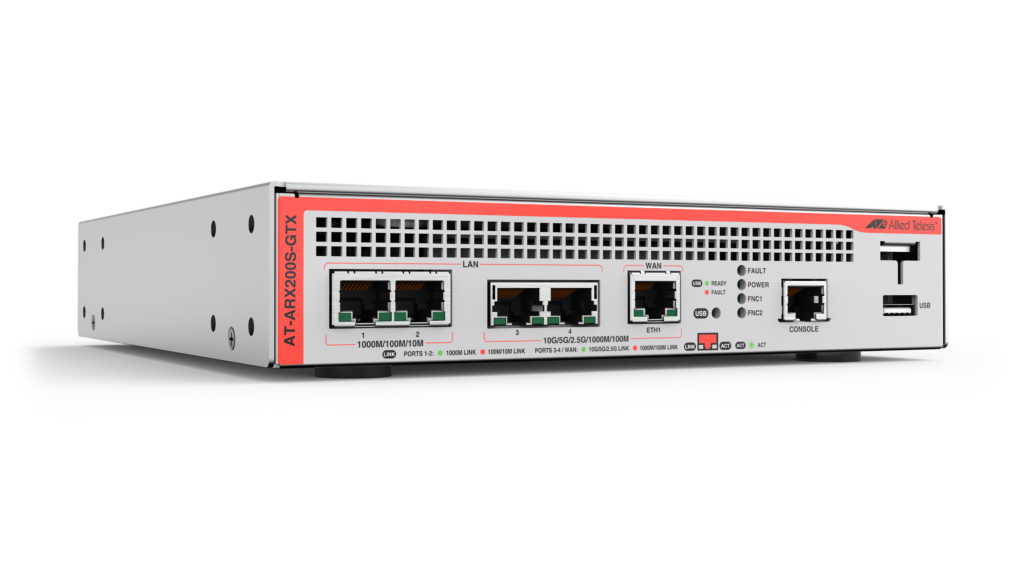
Allied Telesis ARX200S-GTX is the ideal choice for modern businesses requiring Unified Threat Management (UTM) and secure 10G WAN connectivity. The powerful 10G firewall and threat protection is combined with routing and switching, comprehensive VPN support, and SD-WAN capability to provide an innovative high performance business solution.
Overview
- 10G UTM firewall ideal for high-performance Enterprise business deployment
- Comprehensive VPN functionality provides secure remote access, so employees can utilize digital business resources when away from the company premises
- Connect and protect inter-branch traffic to enable seamless online business operation
- Deploy as part of an SD-WAN solution that maximizes performance and optimizes all applications between branches, as well as cloud-based tools and resources
- Full application control allows organizations to manage which online applications their people use and how they use them
- Unified Threat Management (UTM) safeguards digital assets and prevents web-based threats from affecting business operation
- Vista Manager mini, integrated into the Device GUI, provides simplified wireless deployment and management, with floor and heat maps for Wi-Fi performance monitoring
- Web control provides a simple means to boost user productivity, ensure compliance, and save bandwidth, all while preventing web-based threats from infecting business networks
Key Features
- Advanced Firewall and Advanced Threat Protection licenses enable leading traffic control and threat protection features
- AlliedWare Plus™ feature-rich operating system
- Application aware 10G firewall with Deep Packet Inspection (DPI)
- Autonomous Management Framework™ Plus (AMF Plus) automates wired network and device management
- Autonomous Wave Control (AWC) automates and optimizes wireless AP management
- Intuitive Device GUI for security monitoring and management
Specifications
| Security Processor | 2.2GHz 4-core |
|---|---|
| Memory (RAM) | 2GB |
| Memory (Flash) | 4GB |
| Max power consumption | 30W |
| LAN ports* | 2 x 100/1G/2.5G/5G/10G RJ-45, 2 x 10/100/1000T RJ-45 |
| WAN ports | 1 x 100/1G/2.5G/5G/10G RJ-45 |
| Other ports | 1 x USB port, 1 x RJ-45 console port |
| Site-to-site VPN tunnels (IPsec) | 1000 |
| Client-to-site VPN tunnels (OpenVPN) | 500 |
* A LAN switch port can be configured as a second WAN port for resilience and higher performance.
Performance
| Firewall Throughput | 5.5Gbps |
|---|---|
| Firewall Concurrent Sessions | 600,000 |
| VPN Throughput (AES-GCM) | 2.5Gbps |
| VPN Throughput (AES256/SHA256) | 2Gbps |
| UTM Throughput (Application Control/Web Control)* | 1.4Gbps |
| UTM Throughput (IP Reputation/Advanced IPS)* | 1.2Gbps |
* Note: Actual values may vary considerably depending on network environment.
Ordering Information
AT-ARX200S-GTX-xx
1 x 100/1G/2.5G/5G/10G WAN
2 x 100/1G/2.5G/5G/10G LAN
2 x 10/100/1000 LAN
Where xx =
10 for USA power cord
30 for UK power cord
40 for Australian power cord
50 for European power cord
AT-RKMT-J15
Rack mount kit to install two devices side by side
in a 19-inch equipment rack
AT-RKMT-J14
Rack mount kit to install one device in a 19-inch
equipment rack
AT-BRKT-J24
Wall mount kit for AT-ARX200S-GTX
AT-STND-J03
Stand-kit for AT-ARX200S-GTX
AT-VT-kit3
USB console Cable
Security Licenses
| Name | Description | Includes |
|---|---|---|
| AT-ARX2-UTM-01-1YR(1) | Advanced Firewall license (1 year) | Application Control (Sandvine) Web Control (Opentext) |
| AT-ARX2-UTM-01-3YR(1) | Advanced Firewall license (3 years) | Application Control (Sandvine) Web Control (Opentext) |
| AT-ARX2-UTM-01-5YR(1) | Advanced Firewall license (5 years) | Application Control (Sandvine) Web Control (Opentext) |
| AT-ARX2-UTM-02-1YR(1) | Advanced Threat Protection license (1 year) | Advanced IPS (Emerging Threat) IP Reputation (Emerging Threat) |
| AT-ARX2-UTM-02-3YR(1) | Advanced Threat Protection license (3 years) | Advanced IPS (Emerging Threat) IP Reputation (Emerging Threat) |
| AT-ARX2-UTM-02-5YR(1) | Advanced Threat Protection license (5 years) | Advanced IPS (Emerging Threat) IP Reputation (Emerging Threat) |
(1) UTM-01 and UTM-02 license can be used together from AW+ 5.5.4-1.2 onwards
Feature Licenses
| Name | Description | Includes |
|---|---|---|
| AT-RT-APM10-1YR(2)(3) | Cumulative AMF Plus Master license | AMF Plus Master license for up to 10 nodes for 1 year |
| AT-RT-APM10-5YR(2)(3) | Cumulative AMF Plus Master license | AMF Plus Master license for up to 10 nodes for 5 years |
| AT-RT-AWC10-1YR(4) | Cumulative AWC license | Autonomous Wave Control (AWC) license for up to 10 access points for 1 year |
| AT-RT-AWC10-5YR(4) | Cumulative AWC license | Autonomous Wave Control (AWC) license for up to 10 access points for 5 years |
| AT-RT-CB5-1YR 2022(5) | AWC-CB and AWC-SC license | AWC Channel Blanket and AWC Smart Connect license for up to 5 access points for 1 year |
| AT-RT-CB5-5YR 2022(5) | AWC-CB and AWC-SC license | AWC Channel Blanket and AWC Smart Connect license for up to 5 access points for 5 years |
(2) Purchase one license per 10 nodes (up to 15 nodes maximum)
(3) From AW+ version 5.5.2-2 onwards, AMF Plus license provide all standard AMF network management and automation features. They also enable the AMF Plus intent-base networking features in Vista Manager EX (from version 3.10.1 onward)
(4) 20 APs can be managed for free, and an additional 30 APs with a feature license (up to 50 APs maximum)
(5) Channel Blanket and Smart Connect are not available as a free service. Both an AWC-CB license and an AWC license are required for Channel Blanket and Smart Connect to operate. The AWC-CB license supports up to 5 APs
Documentation

Datasheet: ARX200S-GTX
Datasheet for Allied Telesis ARX200S-GTX secure 10G SD-WAN Firewall

Visio Stencils: ARX200S
Visio stencils for the ARX200S-GTX and ARX200S-GT secure 10G SD-WAN Firewalls

Installation Guide: ARX200S Router Series
This guide contains the installation instructions for the ARX200S-GT and ARX200S-GTX routers from Allied Telesis, Inc.

Solution Guide: UTM Features Overview
An overview of the Unified Threat Management (UTM) features available in Allied Telesis firewalls for an advanced threat protection solution.
Solution Guide: Secure Remote Access
Allied Telesis provides secure solutions for companies to connect branch and head offices.
Getting Started with the Device GUI on UTM Firewalls
This guide shows how to configure a UTM Firewall (AR4050S, AR4050S-5G, or AR3050S) using the Graphical User Interface (GUI). It also covers the Virtual UTM Firewall running on the Vista Manager Network Appliance (VST-APL).
Getting Started with the AlliedWare Plus Command Line Interface
This guide introduces a number of commonly-used management features of the AlliedWare Plus Operating System.
Vista Manager mini Technical Documents
The set of technical documents for Vista Manager mini, which is a simplified version of Vista Manager EX and is part of the web-based Device GUI on some AlliedWare Plus switches, firewalls, and VPN routers. These documents cover wired (AMF), wireless (AWC) and third party (SNMP) device management.
Novice Guide to Networking with AlliedWare Plus
This document provides an overview of considerations when deploying a network in a simple, easy to follow guide.

OSPFv3 Feature Overview and Configuration Guide
This guide will teach you the basics of using OSPFv3 on AlliedWare Plus, and how to view and monitor your OSPFv3 set up and behaviour.
Lightweight Directory Access Protocol (LDAP) Feature Overview and Configuration Guide
This guide provides information for configuring OpenVPN Access Server to authenticate against Active Directory using Lightweight Directory Access Protocol (LDAP).
GRE and Multipoint VPNs Feature Overview and Configuration Guide
This guide describes Generic Routing Encapsulation (GRE) and its configuration on AlliedWare Plus™.
Related Videos

Video: Secure Software-Defined WAN (SD-WAN)

Video: Vista Manager Easy Inter-Branch VPN Creation