
The Allied Telesis 10 Gigabit Unified Threat Management (UTM) Firewall application provides an ideal integrated security platform for modern businesses. A powerful 10G firewall and threat protection is combined with comprehensive VPN capability. Easily and securely connect the head-office to branch-offices for an innovative high performance business solution.
10GbE UTM Firewall
Firewall Application for the Vista Manager Network Appliance
Add to quoteView Datasheet
Overview
- 10 Gigabit UTM firewall ideal for high-performance Enterprise business deployment
- Comprehensive VPN functionality provides secure remote access, so employees can utilize digital business resources when away from the company premises
- Connect and protect inter-branch traffic to enable seamless online business operation
- Deploy as part of an SD-WAN solution that maximizes performance and optimizes all applications between branches, as well as cloud-based tools and resources
- Full application control allow organizations to manage which online applications their people use and how they use them
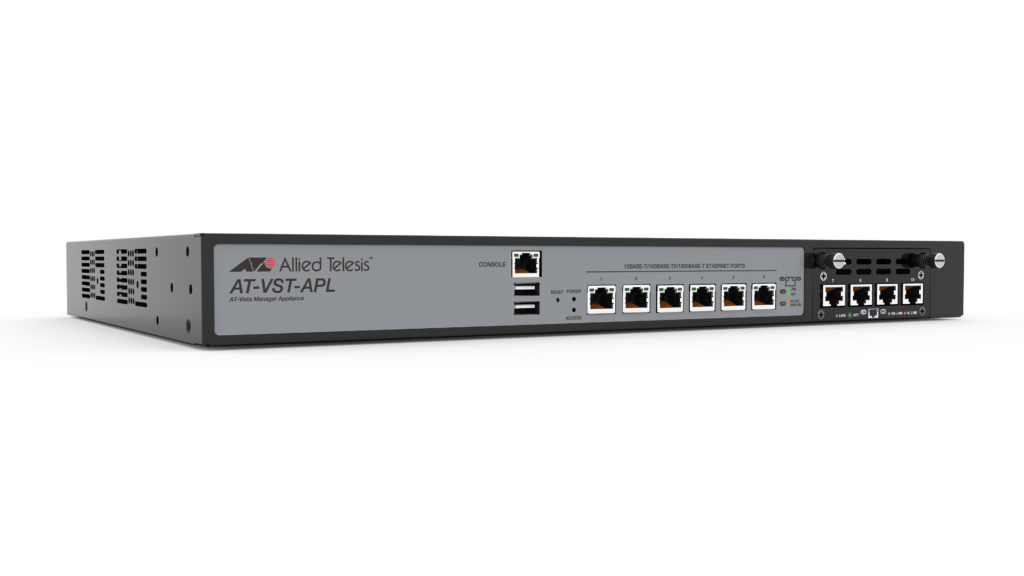
- The UTM firewall runs as a licensed application on a Vista Manager Network Appliance
- Web control provides a simple means to boost user productivity, ensure compliance, and save bandwidth, all while preventing web-based threats from infecting business networks
Key Features
- Advanced Firewall and Advanced Threat Protection licenses enable leading traffic control and threat protection features
- AlliedWare Plus™ feature-rich operating system
- Application aware 10G firewalling with Deep Packet Inspection
- Intuitive Device GUI for security monitoring and management
- Secure business operation with the Intrusion Prevention System (IPS)
Specifications
| Product | Width x Depth x Height | Unpackaged Weight | Packaged Weight | 10/100/1000T RJ45 Copper Ports | 100/1000/10G RJ45 Copper Ports | USB Ports |
|---|---|---|---|---|---|---|
| VST-APL-06 | 438 x 292 x 44 mm (17.24 x 11.49 x 1.73 in) |
4.5 kg (9.92 lb) | 7.5 kg (16.53 lb) | 6 | – | 1 |
| VST-APL-10 | 438 x 292 x 44 mm (17.24 x 11.49 x 1.73 in) |
4.9 kg (10.80 lb) | 7.9 kg (17.41 lb) | 6 | 4 | 1 |
Power Characteristics
| Product | Max Power Consumption | Max Heat Dissipation | Noise |
|---|---|---|---|
| VST-APL-06 | 110 Watts | 511.9 BTU/h | 29 dBA |
| VST-APL-10 | 150 Watts | 375.4 BTU/h | 29 dBA |
Performance
| Feature | Performance |
|---|---|
| Firewall throughput (Raw) | 20 Gbps |
| Firewall throughput (App Control) | 18 Gbps |
| Concurrent sessions | 1,000,000 |
| IPS throughput | 16 Gbps |
| IP Reputation throughput | 18 Gbps |
| Malware protection throughput | 13 Gbps |
| VPN throughput | 5 Gbps |
Note: All performance values are UDP maximums, and vary depending on system configuration..
Ordering Information
AT-VST-APL-06(1)
AT-Vista Manager Network Appliance with
6 x 10/100/1000T copper ports
AT-VST-APL-10(1)
AT-Vista Manager Network Appliance with
6 x 10/100/1000T, and 4 x 100/1000T/10G
copper ports
AT-FL-VFW-BASE(1)
Firewall license to enable the UTM Firewall
application on the AT-VST-APL-06 or
AT-VST-APL-10 Vista Manager Network Appliance
(1) To use the Virtual UTM Firewall purchase a Vista Manager Network Appliance. Follow the install guide instructions to install and use the UTM Firewall application.
Security Licenses
| License Name | Includes | 1 year Subscription | 3 year Subscription | 5 year Subscription |
|---|---|---|---|---|
| Advanced Firewall | Application Control Web Control |
AT-AR4-UTM-01-1YR(1) | AT-AR4-UTM-01-3YR(1) | AT-AR4-UTM-01-5YR(1) |
| Advanced Threat Protection | Advanced IPS IP Reputation |
AT-AR4-UTM-02-1YR(1) | AT-AR4-UTM-02-3YR(1) | AT-AR4-UTM-02-5YR(1) |
(1) The AT-AR4-UTM-01 and AT-AR4-UTM-02 licenses cannot be used together
Documentation

Datasheet: Virtual UTM Firewall
Product information about the 10G Virtual UTM Firewall for high speed Enterprise gateway applications.

Installation Guide: Vista Manager Appliance (VST-APL)
This guide describes the VST-APL hardware options and their installation. VST-APL can be used for network management or as a 10G UTM firewall.

Release Notes for Virtual UTM Firewall Version 5.5.1-x.x
This page contains release notes for all the Virtual UTM Firewall versions, including their maintenance releases.
Release Notes for AlliedWare Plus™ Version 5.5.2-x.x
This page contains release notes for all the AlliedWare Plus 5.5.2 versions. It covers 5.5.2-0, 5.5.2-1 and 5.5.2-2, and their maintenance releases.

Command Reference: Virtual UTM Firewall Running AlliedWare Plus Version 5.5.1
The command reference manual describes all the commands available on the Virtual UTM Firewall running AlliedWare Plus version 5.5.1-2.x.
Lightweight Directory Access Protocol (LDAP) Feature Overview and Configuration Guide
This guide provides information for configuring OpenVPN Access Server to authenticate against Active Directory using Lightweight Directory Access Protocol (LDAP).
Release Notes for 10GbE UTM Firewall Version 5.5.2-x.x
This page contains release notes for all the 10GbE UTM Firewall 5.5.2 versions, including their maintenance releases.
Command Reference: 10GbE UTM Firewall Running AlliedWare Plus Version 5.5.2
The command reference manual describes all the commands available on the 10GbE UTM Firewall running AlliedWare Plus version 5.5.2-x.x.
Novice Guide to Networking with AlliedWare Plus
This document provides an overview of considerations when deploying a network in a simple, easy to follow guide.
OSPFv3 Feature Overview and Configuration Guide
This guide will teach you the basics of using OSPFv3 on AlliedWare Plus, and how to view and monitor your OSPFv3 set up and behaviour.
OSPF Feature Overview and Configuration Guide
This guide provides an example OSPF network diagram, and describes some of the main configuration parameters for OSPF using the AlliedWare Plus Operating System.
Getting Started with the Device GUI on UTM Firewalls
This guide shows how to configure a UTM Firewall (AR4050S, AR4050S-5G, or AR3050S) using the Graphical User Interface (GUI). It also covers the Virtual UTM Firewall running on the Vista Manager Network Appliance (VST-APL).