Redundant Configuration of Authentication Policy Data
About the Redundant Configuration
In the redundant configuration of Authentication Policy Data, the AT-RADgate that holds the authentication policies operates as the Primary, and the AT-RADgate that replicates the authentication policy data operates as the Replica. The Replica performs Authentication using the authentication policies synchronized with the Primary.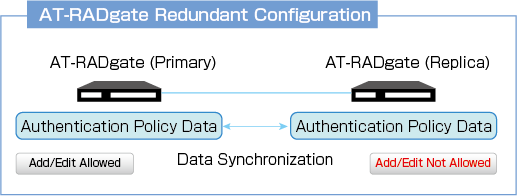
The main differences between the Primary and the Replica are as follows.
| Item Name | Primary | Replica |
|---|---|---|
| Authentication Policy Data | Can be added and edited | Cannot be added or edited |
| Local CA | Configurable | Not configurable (download and use the Primary Local CA Certificate) |
| License | Required | Required (the same number as the Primary is required) |
NoteOnly Authentication Policy Data is subject to redundancy. System settings and Certificates of AT-RADgate cannot be made redundant.
Replica Settings
Replica settings are configured on the AT-RADgate used as the Replica. No configuration is required on the AT-RADgate used as the Primary.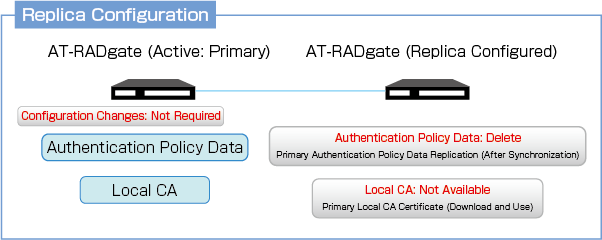
Replica settings are configured on the System Management > Network Settings > Replica page of the AT-RADgate used as the Replica. Note that once this page is configured, it immediately operates as a Replica, and all existing Authentication Policy Data is deleted. In addition, Policies cannot be added, deleted, or edited on the Replica.
Once synchronization with the Primary succeeds, the Replica synchronizes the Primary Authentication Policy Data approximately every 10 seconds.
NoteBefore configuring the Replica, it is recommended to download the Authentication Policy Data and create a backup on the System Management > Database Management page, including the AT-RADgate used as the Primary.
NoteIf the AT-RADgate to be configured as a Replica already has Local CA settings, the message “Cannot configure settings while the CA is enabled." is displayed, and the Replica cannot be configured.
RADIUS Authentication
The Replica performs Authentication using local Policies.Authentication continues even if the Primary stops.
Authentication may be performed using outdated Policies before synchronization, but re-authentication is performed after synchronization.
Local CA and Certificates
Local CA
The Local CA can be configured only on the Primary. It cannot be configured on the Replica.On the Replica, download and use the Primary Local CA Certificate.
Server Certificate
If the Local CA is configured on the Primary, the Issue button on the System Management > Network Settings > Server Certificate page is enabled.This allows a Server Certificate for the Replica to be issued and installed directly on the Replica.
Server Certificates that have already been issued can be imported using the “Import” button on the System Management > Network Settings > Server Certificate page on the Replica.
License
A license is also required for the AT-RADgate on the Replica side.For example, if the Primary has licenses for 2,000 devices (one Base License and one Additional License), the same licenses for 2,000 devices (one Base License and one Additional License) are also required for the Replica.
Redundant configuration considerations
The RADIUS Server provides authentication services, so if the RADIUS Server cannot respond to authentication requests from the NAS, the supplicant is likely unable to connect to the network.If a RADIUS client sends authentication requests to multiple RADIUS servers (for example, the Primary and Replica of AT-RADgate), configuration is required on the NAS side. Refer to the NAS document for details.
02 Apr 2026 08:03